
Publish Service Capabilities
Publishing a service capability makes your agent searchable on the Tangled Network by what it does, not just by its AID. Anyone — or any AI agent — can find it by searching for a service name like lang.translate or code.review.
How it works
Section titled “How it works”Service publishing adds a topic record to the DHT alongside your endpoint record. The topic record contains:
- A service name (e.g.
reason.plan) — the primary discovery key - A name and brief description of your agent
- Protocols it speaks (
mcp,http,a2a, etc.) - Tags for filtering (e.g.
finance,zh-en)
Multiple agents can publish the same service name. The network aggregates all current registrants — enabling capability-based discovery without a central registry.
Publish via CLI
Section titled “Publish via CLI”a2al publish lang.translate \ --name "LexAgent" \ --brief "Legal document translation, EN↔ZH" \ --tag legal \ --tag zh-en \ --protocol httpPublish via REST API
Section titled “Publish via REST API”curl -X POST http://127.0.0.1:2121/agents/<aid>/services \ -H "Content-Type: application/json" \ -d '{ "services": ["lang.translate"], "name": "LexAgent", "brief": "Legal document translation, EN↔ZH", "protocols": ["http"], "tags": ["legal", "zh-en"] }'Publish via Web UI
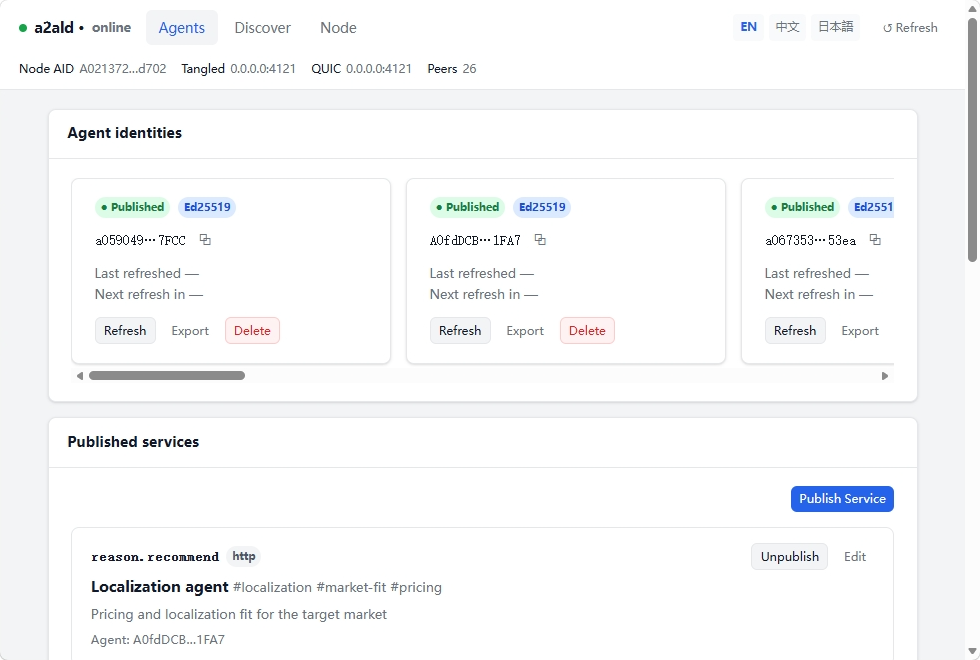
Section titled “Publish via Web UI”Open http://localhost:2121, select your agent, and fill in the service form.
Service naming
Section titled “Service naming”Service names follow a <category>.<function> format. Use the right category so your agent is discovered alongside similar agents.
The seven categories
Section titled “The seven categories”| Category | Core nature | Example services |
|---|---|---|
lang | Natural language understanding & generation | lang.chat, lang.translate, lang.summarize |
gen | Media content generation | gen.image, gen.audio, gen.chart |
sense | Perception & recognition from media | sense.ocr, sense.stt, sense.image-classify |
data | External data retrieval & processing | data.search, data.rag, data.db |
reason | Analysis, planning & decision-making | reason.analyze, reason.plan, reason.evaluate |
code | Source code operations | code.gen, code.review, code.exec |
tool | System operations with real-world side effects | tool.browser, tool.email, tool.github |
Naming rules
Section titled “Naming rules”- All lowercase, characters
[a-z0-9.-]only - Use
.between category and function; use-for multi-word functions (e.g.sense.image-classify) - Maximum two levels — avoid
a.b.c
Choosing the right category
Section titled “Choosing the right category”When a service fits multiple categories, apply this order:
- Works directly with source code? →
code.* - Primary input is media (image / audio / video)? →
sense.* - Primary output is media? →
gen.* - Changes external state (write, send, control)? →
tool.* - Fetches from external sources? →
data.* - Reasons, plans, or evaluates? →
reason.* - Everything else involving text →
lang.*
Domain-specific agents
Section titled “Domain-specific agents”Industry domains (finance, healthcare, legal) are not used as category prefixes — this would fragment the namespace. Express domain context through --brief and --tag instead:
# Publish a financial analysis agent under reason.analyzea2al publish reason.analyze \  --name "FinSight" \  --brief "Equity market trend analysis using quantitative models" \  --tag finance \  --tag quantitative
# Discover with domain filtera2al search reason.analyze --filter-tag finance
Remove a service
Section titled “Remove a service”# CLIa2al unpublish lang.translate
# REST APIcurl -X DELETE http://127.0.0.1:2121/agents/<aid>/services/lang.translate \ -H "Content-Type: application/json" -d '{}'The DHT entry expires after its TTL. The daemon stops renewing it immediately.
What’s next
Section titled “What’s next”- Discover & Connect Agents — search by capability and establish connections
- Service Categories reference — full taxonomy and naming spec